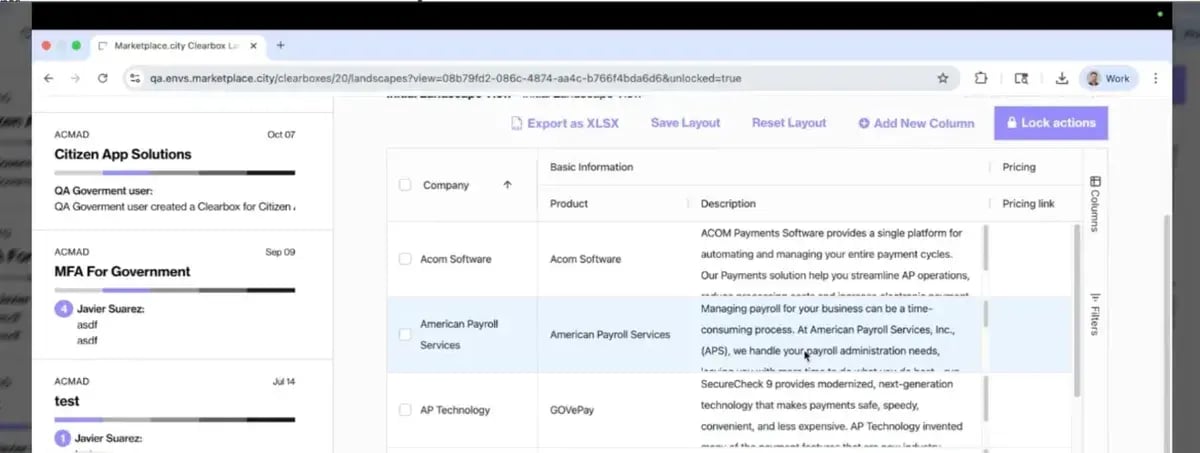
Custom Columns makes that possible. You can now add your own fields directly within your private Clearbox view, keeping all your information in one place while maintaining a consistent structure across your organization.
Why We Built It
We heard a common theme: users wanted to track internal details that don’t appear in a shared Market Landscape. Things like whether a vendor is already under contract, where a company is based, or which cooperative purchasing agreements apply. These details are often critical for procurement teams but weren’t easily supported in the standard layout.
By making the structure customizable, every customer can shape the landscape to match their internal review and buying process — without breaking the shared framework the platform depends on. The goal is simple: one reliable source of truth that still adapts to how your team works.
How It’s Being Used
Teams are already using Custom Columns to:
- Take collaborative notes on products under evaluation
- Keep internal, private notes on vendor performance or fit
- Add compliance or location fields (e.g., “U.S.-based company” or “Meets NIST 800-171”)
- Track whether a vendor is current, past, or prospective
- Identify available cooperative contracts like OMNIA Partners
These additions make the data more actionable — especially for agencies managing complex or ongoing procurement processes.
How to Use It
- In your private Clearbox view, unlock <strong>Actions</strong>.
- Select <strong>Add Column</strong>.
- Enter a name and choose a column type: free text, yes/no, external link, date, or number.
- Add a description if needed.
- Optionally toggle whether others can edit your column.
Your column appears instantly, integrated into your view of the Market Landscape.
A Shared Structure That Adapts to You
Custom Columns give you flexibility without losing consistency. They make it easier to keep private context and shared data connected — so your team can work from the same information while tailoring it to what matters most.